
myst-nb#
MyST-NB is a Sphinx extension for parsing and executing Jupyter Notebooks with MyST Markdown.
Documentation: https://myst-nb.readthedocs.io/
Source Code: https://github.com/executablebooks/MyST-NB
Basic Outputs#
Simple Expression#
6 * 7
42
Print Statements#
print("Hello, world!")
Hello, world!
Multiple Outputs#
print("First output")
print("Second output")
"Return value"
First output
Second output
'Return value'
Rich Outputs#
DataFrames#
import pandas as pd

data = {
    "Name": ["Alice", "Bob", "Charlie", "Diana"],
    "Age": [25, 30, 35, 28],
    "City": ["New York", "London", "Paris", "Tokyo"]
}
pd.DataFrame(data)
| Name | Age | City | |
|---|---|---|---|
| 0 | Alice | 25 | New York |
| 1 | Bob | 30 | London |
| 2 | Charlie | 35 | Paris |
| 3 | Diana | 28 | Tokyo |
Numeric DataFrame#
import numpy as np

np.random.seed(42)
df = pd.DataFrame(
    np.random.randn(8, 4),
    columns=["A", "B", "C", "D"]
)
df
| A | B | C | D | |
|---|---|---|---|---|
| 0 | 0.496714 | -0.138264 | 0.647689 | 1.523030 |
| 1 | -0.234153 | -0.234137 | 1.579213 | 0.767435 |
| 2 | -0.469474 | 0.542560 | -0.463418 | -0.465730 |
| 3 | 0.241962 | -1.913280 | -1.724918 | -0.562288 |
| 4 | -1.012831 | 0.314247 | -0.908024 | -1.412304 |
| 5 | 1.465649 | -0.225776 | 0.067528 | -1.424748 |
| 6 | -0.544383 | 0.110923 | -1.150994 | 0.375698 |
| 7 | -0.600639 | -0.291694 | -0.601707 | 1.852278 |
Styled DataFrame#
df.style.highlight_max(axis=0,props=("color:white; font-weight:bold; background-color:blueviolet;"))
| A | B | C | D | |
|---|---|---|---|---|
| 0 | 0.496714 | -0.138264 | 0.647689 | 1.523030 |
| 1 | -0.234153 | -0.234137 | 1.579213 | 0.767435 |
| 2 | -0.469474 | 0.542560 | -0.463418 | -0.465730 |
| 3 | 0.241962 | -1.913280 | -1.724918 | -0.562288 |
| 4 | -1.012831 | 0.314247 | -0.908024 | -1.412304 |
| 5 | 1.465649 | -0.225776 | 0.067528 | -1.424748 |
| 6 | -0.544383 | 0.110923 | -1.150994 | 0.375698 |
| 7 | -0.600639 | -0.291694 | -0.601707 | 1.852278 |
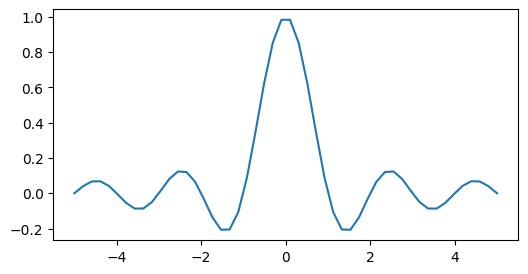
Matplotlib#
import matplotlib.pyplot as plt

fig, ax = plt.subplots(figsize=[6, 3])
x = np.linspace(-5, 5, 50)
ax.plot(x, np.sinc(x))
plt.show()
LaTeX Math#
from IPython.display import Math

Math(r"\int\limits_{-\infty}^\infty f(x) \delta(x - x_0) dx = f(x_0)")
\[\displaystyle \int\limits_{-\infty}^\infty f(x) \delta(x - x_0) dx = f(x_0)\]
HTML Output#
from IPython.display import HTML

HTML("""
<div style="padding: 1rem; border: 2px solid #3b82f6; border-radius: 8px;">
    <strong>Custom HTML Block</strong>
    <p>This is rendered HTML output from IPython.display.</p>
</div>
""")
Custom HTML Block
This is rendered HTML output from IPython.display.
Markdown Output#
from IPython.display import Markdown

Markdown("""
**Bold text** and *italic text* rendered from code.

- Item one
- Item two
- Item three
""")
Bold text and italic text rendered from code.
Item one
Item two
Item three
Images#
from IPython.display import Image

Image(url="https://picsum.photos/400/400", width=400)
Cell Visibility#
Hide Input#
The source code is hidden but output is visible.
Sum of 1-10: 55
Hide Output#
The source code is visible but output is hidden.
# Output is hidden
print("This output is hidden")
Hide Cell#
Both input and output are hidden but can be toggled.
Remove Input#
Input is completely removed from the page.
Only this output appears, no code visible at all
Remove Output#
Output is completely removed from the page.
# This code is visible but output is completely removed
print("This output will not appear")
Remove Cell#
The entire cell is removed from the page (nothing visible).
Error Handling#
Traceback Display#
def divide(a, b):
    return a / b

divide(1, 0)
---------------------------------------------------------------------------
ZeroDivisionError                         Traceback (most recent call last)
Cell In[18], line 4
      1 def divide(a, b):
      2     return a / b
----> 4 divide(1, 0)

Cell In[18], line 2, in divide(a, b)
      1 def divide(a, b):
----> 2     return a / b

ZeroDivisionError: division by zero
Standard Error#
import sys
print("This appears on stderr", file=sys.stderr)
This appears on stderr
Warnings#
import warnings
warnings.warn("This is a warning message", UserWarning)
/tmp/ipykernel_2268/3847202493.py:2: UserWarning: This is a warning message
  warnings.warn("This is a warning message", UserWarning)
ANSI Colors#
Colored Terminal Output#
print("\033[31mRed text\033[0m")
print("\033[32mGreen text\033[0m")
print("\033[33mYellow text\033[0m")
print("\033[34mBlue text\033[0m")
print("\033[35mMagenta text\033[0m")
print("\033[36mCyan text\033[0m")
print("\033[1m\033[31mBold red text\033[0m")
print("\033[4m\033[34mUnderlined blue text\033[0m")
Red text
Green text
Yellow text
Blue text
Magenta text
Cyan text
Bold red text
Underlined blue text
Glue#
Store variables and embed them elsewhere in the document.
from myst_nb import glue

my_value = 42
glue("answer", my_value)

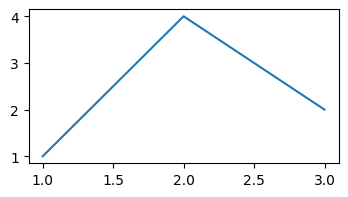
import matplotlib.pyplot as plt
fig, ax = plt.subplots(figsize=[4, 2])
ax.plot([1, 2, 3], [1, 4, 2])
glue("my_figure", fig, display=False)
42
The answer is 42. Here’s the figure:
A glued matplotlib figure.#