
jupyter-sphinx#
Sphinx extension that executes embedded code in a Jupyter kernel and embeds outputs in the document.
Documentation: https://jupyter-sphinx.readthedocs.io/
Source Code: https://github.com/jupyter/jupyter-sphinx
Basic Usage#
Use the jupyter-execute directive to embed executable code:
name = 'world'
print('hello ' + name + '!')
hello world!
All cells share the same kernel, so variables persist across cells:
a = 1
print('first cell: a = {}'.format(a))
first cell: a = 1
a += 1
print('second cell: a = {}'.format(a))
second cell: a = 2
Rich Output#
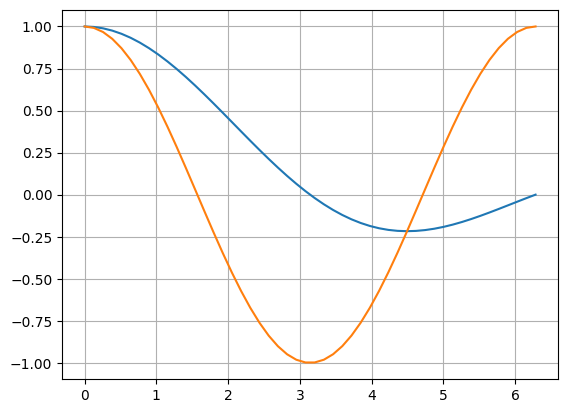
Plots#
import numpy as np
from matplotlib import pyplot
%matplotlib inline

x = np.linspace(1E-3, 2 * np.pi)
pyplot.plot(x, np.sin(x) / x)
pyplot.plot(x, np.cos(x))
pyplot.grid()
LaTeX#
from IPython.display import Latex
Latex(r'\int_{-\infty}^\infty e^{-x^2}dx = \sqrt{\pi}')
Widgets#
Interactive widgets rendered via ipywidgets.
import ipywidgets as w
from IPython.display import display
Numeric#
Sliders#
display(
    w.IntSlider(value=5, min=0, max=10, description='IntSlider:'),
    w.IntRangeSlider(value=[3, 7], min=0, max=10, description='Range:'),
)
Progress Bars#
display(
    w.IntProgress(value=7, min=0, max=10, description='Default:'),
    w.IntProgress(value=5, min=0, max=10, description='Info:', bar_style='info'),
    w.IntProgress(value=8, min=0, max=10, description='Success:', bar_style='success'),
    w.IntProgress(value=3, min=0, max=10, description='Warning:', bar_style='warning'),
    w.IntProgress(value=6, min=0, max=10, description='Danger:', bar_style='danger'),
)
Boolean#
display(
    w.Checkbox(value=True, description='Checkbox'),
    w.ToggleButton(value=False, description='Toggle', icon='check'),
    w.Valid(value=True, description='Valid'),
    w.Valid(value=False, description='Invalid'),
)
Selection#
options = ['Option A', 'Option B', 'Option C']
display(
    w.Dropdown(options=options, value='Option A', description='Dropdown:'),
    w.RadioButtons(options=options, description='Radio:'),
    w.Select(options=options, description='Select:', rows=3),
    w.SelectMultiple(options=options, value=['Option A'], description='Multi:', rows=3),
    w.ToggleButtons(options=options, description='Toggles:'),
    w.SelectionSlider(options=options, description='Slider:'),
)
String#
display(
    w.Text(value='Hello', description='Text:'),
    w.Textarea(value='Multi-line\ntext input', description='Textarea:'),
    w.Password(value='secret', description='Password:'),
    w.Combobox(value='', placeholder='Type or select', options=['Apple', 'Banana'], description='Combobox:'),
)
Date & Color#
display(
    w.DatePicker(description='Date:'),
    w.ColorPicker(value='#3b82f6', description='Color:'),
)
File Upload#
display(
    w.FileUpload(accept='.txt', description='Upload'),
)
Play / Animation#
play = w.Play(value=0, min=0, max=100, step=1, interval=100, description='Play:')
slider = w.IntSlider(value=0, min=0, max=100, description='Value:')
w.jslink((play, 'value'), (slider, 'value'))
display(w.HBox([play, slider]))
Containers#
Accordion#
display(w.Accordion(children=[
    w.Label('Content of section one'),
    w.Label('Content of section two'),
], titles=['Section 1', 'Section 2']))
Tabs#
display(w.Tab(children=[
    w.Label('Content of tab one'),
    w.Label('Content of tab two'),
], titles=['Tab 1', 'Tab 2']))
Linked Widgets#
slider = w.IntSlider(description='Value:', min=0, max=100, value=50)
progress = w.IntProgress(description='Progress:', min=0, max=100)
text = w.IntText(description='Number:')
w.jslink((slider, 'value'), (progress, 'value'))
w.jslink((slider, 'value'), (text, 'value'))
display(w.VBox([slider, progress, text]))
Directive Options#
Hide Code#
Use :hide-code: to show only output:
this code is invisible
Hide Output#
Use :hide-output: to show only code:
print('this output is invisible')
Code Below#
Use :code-below: to display code after output:
this code is below the output
print('this code is below the output')
Line Numbers#
Use :linenos: to add line numbers:
1print('A')
2print('B')
3print('C')
A
B
C
Use :lineno-start: to start from a specific line:
7print('A')
8print('B')
9print('C')
A
B
C
Emphasize Lines#
Use :emphasize-lines: to highlight specific lines:
1d = {
2    'a': 1,
3    'b': 2,
4    'c': 3,
5    'd': 4,
6    'e': 5,
7}
Exception Handling#
Use :raises: to display tracebacks as output instead of failing the build:
1 / 0
---------------------------------------------------------------------------
ZeroDivisionError                         Traceback (most recent call last)
Cell In[26], line 1
----> 1 1 / 0

ZeroDivisionError: division by zero
Specify exception types to catch only specific errors:
a = {'hello': 'world!'}
a['jello']
---------------------------------------------------------------------------
KeyError                                  Traceback (most recent call last)
Cell In[27], line 2
      1 a = {'hello': 'world!'}
----> 2 a['jello']

KeyError: 'jello'
stderr Output#
Use :stderr: to display stderr output without build warnings:
import sys
print("hello, world!", file=sys.stderr)
hello, world!
Manual Cells#
Use jupyter-input and jupyter-output for non-executed code samples:
1import time
2
3def slow_print(str):
4    time.sleep(4000)    # Simulate an expensive process
5    print(str)
6
7slow_print("hello, world!")
hello, world!
Rich Outputs#
HTML#
from IPython.display import HTML

HTML("""
<div style="padding: 1rem; border: 2px solid #3b82f6; border-radius: 8px;">
    <strong>Custom HTML</strong>
    <p>Rendered HTML output from IPython.display.</p>
</div>
""")
Rendered HTML output from IPython.display.
Images#
from IPython.display import Image

Image(url="https://picsum.photos/400/400", width=400)
DataFrames#
import pandas as pd

data = {
    "Name": ["Alice", "Bob", "Charlie"],
    "Score": [95, 87, 92],
    "Grade": ["A", "B+", "A-"]
}
pd.DataFrame(data)
| Name | Score | Grade | |
|---|---|---|---|
| 0 | Alice | 95 | A |
| 1 | Bob | 87 | B+ |
| 2 | Charlie | 92 | A- |